
Fuse Wick Marker
Scans your chart for candles with unusually long wicks or tails — a key signal for price rejection at important levels.
Download FreeHow it works
With this indicator, all wicks or tails that exceed a specified length in points can be marked in the ATAS chart. The indicator searches for suitable candles and marks them with a dot above the candle if the wick exceeds the length, or below the candle if the tail exceeds the length.
Fuse Wick Marker is built for the ATAS order-flow platform
New to ATAS? Open ATAS Web in your browser – footprint, volume tools and 240+ indicators, no installation. For live trading and custom indicators like ours, use the free desktop demo or compare plans.
Partner links: if you get ATAS through them, we earn a commission at no extra cost to you – that's what keeps the indicators free. ATAS Web is a prototype with delayed data; broker connection and custom indicators require ATAS Desktop – the ATAS quick-start guide gets you from download to first chart.
What can I use it for?
Identifying Reversal Points
The indicator helps identify potential reversal points by highlighting candles with unusually long wicks or tails. These marked candles can indicate a shift in market sentiment.
Enhancing Price Action Strategies
Traders can use this indicator to better understand market volatility and liquidity. The visual cues show price rejection and areas of strong buying or selling pressure.
Filtering Trade Entries
The indicator can be used to filter trade entries by identifying candles with strong price rejection — helping you avoid weak setups.
Improving Stop Loss Placement
By marking candles with significant tails or wicks, it can suggest more informed placements for stop losses, reducing the risk of premature stop-outs.
Settings
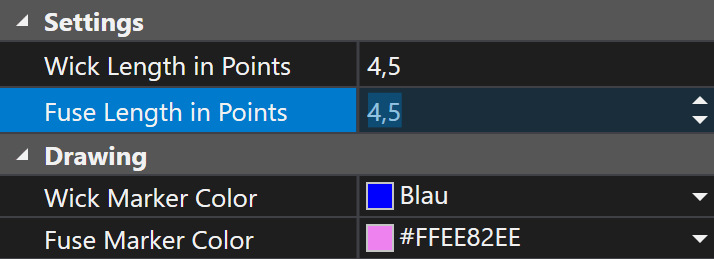
Wick Length in Points
Specifies the minimum length of a wick (upper shadow) in points to trigger a marker.
Fuse Length in Points
Determines the minimum length of a tail (lower shadow) in points to trigger a marker.
Wick Marker Color
Sets the color of the marker dot displayed above candles with long wicks.
Fuse Marker Color
Determines the color of the marker dot displayed below candles with long tails.
Frequently Asked Questions
I want to mark multiple candles with different wick lengths differently. Is this possible?
Yes, by applying the indicator multiple times with different colors and parameters. Each instance can have its own threshold and color.
Get Fuse Wick Marker
Subscribe to download all indicators for free — including future updates.
New to ATAS? What ATAS is and which brokers work with it.
Free trading tools: Position Size Calculator · Risk/Reward Calculator · Session Times